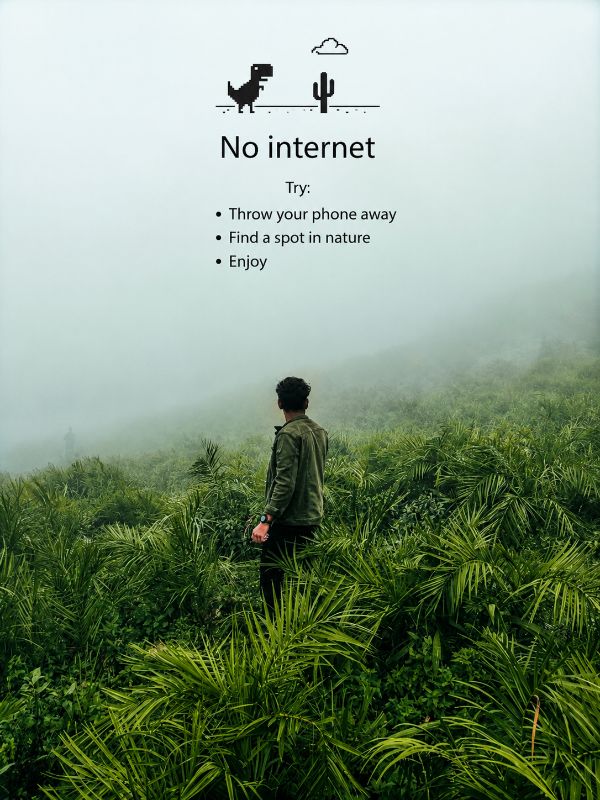
Example result — yours keeps your own face.
🌿 No Signal, Better Connection
Turn a travel photo into a Chrome-inspired offline moment. Preserve the original image while adding a minimalist "No Internet" message that celebrates disconnecting from screens and reconnecting with nature.
222 views♥ 1 savesAdded
Edit the uploaded image only.

Do NOT change the original photograph.

Preserve the road, mountain, sky, clouds, greenery, subject position, clothing, proportions, perspective, and overall composition exactly as they appear.

Do NOT replace the face.

Do NOT alter facial features.

Do NOT change the person's pose.

Do NOT add new scenery.

Do NOT remove any existing details.

Do NOT crop or zoom.

Do NOT apply artistic filters, painting effects, cartoon effects, AI stylization, HDR effects, or cinematic color grading.

IMAGE ENHANCEMENT ONLY

Increase image sharpness slightly (around 10–15%).

Increase clarity slightly.

Increase vibrance and saturation subtly (around 10–15%).

Keep colors natural.

Retain realistic textures.

Preserve cloud details.

Preserve mountain details.

Preserve road texture.

Preserve natural lighting.

Maintain the original travel-photography look.

TEXT OVERLAY

At the top center of the image add the classic Chrome Dinosaur offline screen design.

Small black pixel-style dinosaur icon.

Small black cactus icon.

Simple cloud outline above the dinosaur.

Minimalist black graphic.

Under the graphic add the exact text:

No internet

Try:

• Throw your phone away
• Find a spot in nature
• Enjoy

Use clean Chrome-style typography.

Black text.

Center aligned.

Maintain proper spacing.

Ensure the overlay occupies only the upper sky area without covering the mountain.

FINAL RESULT

The output should look like the original photo with only a subtle sharpness boost, slightly richer colors, and the Chrome-style "No Internet" message added at the top. Everything else must remain unchanged and identical to the uploaded image.

Make the aspect ratio 3:4
How to get the best result
- 01Replace "No internet" with your own custom title.
- 02Change the bullet points to match your personality or travel style.
- 03Keep the text overlay only in the empty sky area for a clean look.
- 04Use black text and simple typography for the authentic Chrome offline aesthetic.
Pro Want even more detailed prompts?
Unlock every Pro prompt from ₹99 — no auto-renewal.
Keep exploring
More everyone prompts.
Traditional South Indian Family Portrait on Wooden Swing
Traditional South Indian Family Portrait on Wooden Swing
Indian Family Studio Portrait | Matching Outfit Photo
Indian Family Studio Portrait | Matching Outfit Photo
Elegant Watercolor Family Portrait from Your Own Photo
Elegant Watercolor Family Portrait from Your Own Photo
Couple Portrait Prompt – Black & White Studio Photo
Couple Portrait Prompt – Black & White Studio Photo
Adorable Baby Girl Watercolor Portrait Poster in Navy Blue Dress
Adorable Baby Girl Watercolor Portrait Poster in Navy Blue Dress
Another Year of Greatness | AI Image Prompt
Another Year of Greatness | AI Image Prompt
Romantic Rainy Window Couple Portrait AI Prompt
Romantic Rainy Window Couple Portrait AI Prompt
Family of 3