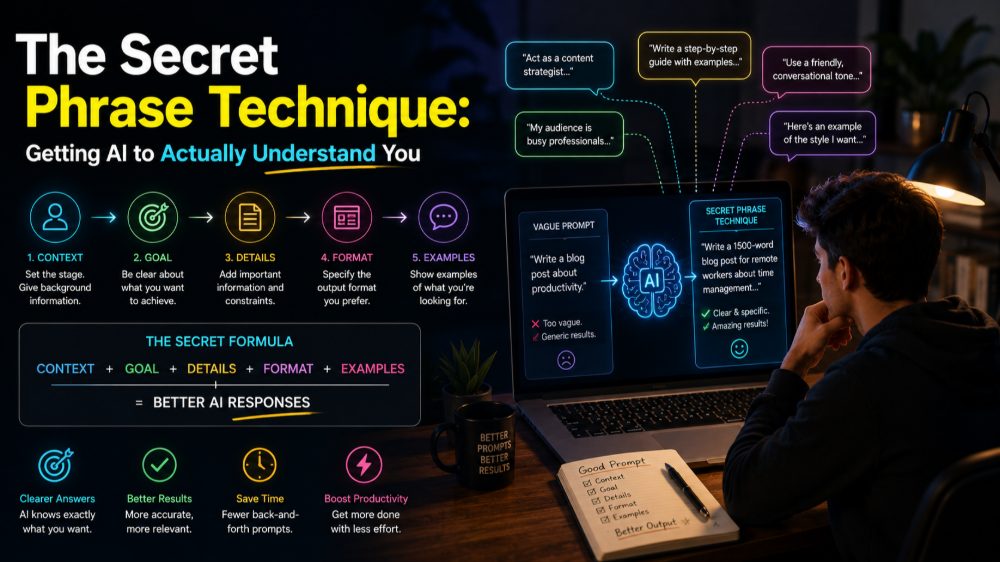
Why Your AI Prompts Aren't Working
You type "create a professional logo" into Midjourney and get something that looks like clip art from a discount website. You ask ChatGPT to "write an email" and receive five paragraphs of corporate jargon no human would actually send. Sound familiar?
The problem isn't the AI. It's that you're speaking a different language.
Most people approach AI tools like they're talking to a mind reader. They assume context, skip crucial details, and wonder why the output misses the mark. The solution lies in a handful of specific techniques that transform how AI interprets your requests.
The Secret Phrase Technique
Here's something most guides won't tell you: AI models respond dramatically better when you assign them a specific role or perspective before your actual request.
Instead of: "Write a product description for noise-canceling headphones"
Try this: "You are an audiophile whoTests headphones professionally and writes for tech enthusiasts. Write a product description for noise-canceling headphones that focuses on technical specifications and real-world performance."
This works because you're not just asking for output—you're establishing a framework for how the AI should think about the task. The secret phrase is essentially "You are [specific role/expertise]" followed by your actual request.
Real example: When generating images in Midjourney, adding "in the style of a National Geographic cover photographer" produces vastly different results than "in the style of Instagram photography"—even if you're describing the same scene.
The Constraint Paradox
Counter-intuitively, adding more constraints usually produces better, more creative results. This applies to both text and image generation.
For ChatGPT or Gemini, try this structure:
- Format constraint: "Write this as exactly 3 bullet points" or "Keep it under 100 words"
- Tone constraint: "Use casual language, like explaining to a friend" or "Write formally for a C-suite audience"
- Content constraint: "Include one specific example" or "Reference current research without using jargon"
For Midjourney or other image AI:
- Lighting constraint: "golden hour lighting" vs. "harsh midday sun" vs. "softbox studio lighting"
- Composition constraint: "rule of thirds composition" or "central symmetry"
- Medium constraint: "35mm film photograph" vs. "digital art" vs. "watercolor painting"
These constraints don't limit creativity—they channel it. A prompt like "a cat" gives you generic results. "A British Shorthair cat, dramatic side lighting, shallow depth of field, shot on 85mm lens" gives you something specific and striking.
The Iteration Loop That Actually Works
Stop trying to craft the perfect prompt on your first attempt. Instead, use this three-step loop:
Step 1: Start broad but structured Get your initial output with basic constraints in place.
Step 2: Identify the gap Look at what's wrong specifically. Not "this isn't good" but "the tone is too formal" or "the composition is too busy."
Step 3: Add surgical corrections Don't rewrite everything. Add one specific instruction addressing the gap: "Make the tone more conversational" or "Simplify the background, keep focus on the subject."
With ChatGPT and similar tools, you can reference previous outputs: "Take version 2, but make it 50% shorter and add a concrete example in the second paragraph."
This beats starting over because the AI maintains context while refining specific elements.
The Detail Placement Strategy
Where you place details in your prompt matters more than you think.
For text generation, put your most important requirement first. ChatGPT and Gemini weight earlier instructions more heavily. If tone matters most, start with it. If format is critical, lead with that.
For image generation, the opposite often applies. Midjourney and similar tools typically prioritize words at the beginning for subject matter, but stylistic details toward the end can fine-tune without overwhelming the core concept.
Compare these:
- "Cinematic lighting, moody atmosphere, dark colors, a detective in a 1940s office"
- "A detective in a 1940s office, cinematic lighting, moody atmosphere, dark colors"
The second usually produces better results because it establishes the subject before modifying it.
The Negative Space Method
Sometimes the best way to get what you want is to specify what you don't want.
In Midjourney, use negative prompts: "--no text, watermarks, signatures" or "--no bright colors, modern elements."
In ChatGPT or Gemini, try: "Write a project update email without using the phrases 'circle back,' 'touch base,' or 'synergy.' Avoid bullet points."
This works because it prevents the AI from falling into common patterns. AI models have default tendencies—corporate speak in text, certain compositional cliches in images. Negative constraints push them out of those ruts.
Practical Combinations That Work
Putting these techniques together:
For a resume bullet point: "You are a hiring manager at a tech company. Write one accomplishment bullet point for a project manager who reduced deployment time. Use the format: action verb + specific metric + business impact. Keep it under 25 words. Avoid buzzwords like 'synergy' or 'leverage.'"
For a travel photo concept: "A narrow cobblestone street in a Mediterranean village, early morning golden hour lighting, shot on 50mm lens at f/2.8, rule of thirds composition, warm color palette --no tourists, cars, power lines"
Notice how each combines role-setting, constraints, detail placement, and negative space.
Keep Experimenting
The difference between mediocre and exceptional AI outputs usually comes down to prompt structure, not the tool itself. These techniques work across platforms because they address how AI models process language and instruction.
When you find combinations that work for your specific needs, save them. Build your own prompt library. Adapt and refine.
Explore ready-to-use AI prompts on Nohaya PromptAi, where you'll find tested templates and examples that put these techniques into practice across different use cases.